
Medium Slow and Long Turbo Testing in Philadelphia
As a review, two weeks ago we tested MediumSlow 22 for one week and then we moved to LongTurbo 12 for a week. Read more about that in our explainer article here. We now wanted to update everyone with the results of our testing.
First, a HUGE thank you to everyone who has been so helpful, patient, and willing to share time/effort getting nodes into these test modes. Including this week’s frantic “uhhhhhh everyone update firmware nowwww”. Y’all have been awesome with all these changes and tests and we sincerely thank you all. These tests would not work without your help. We acknowledge the ask to change Lora settings frequently has been… tiring to put it nicely.
Why did we conduct the tests?
So a quick reminder on the WHY. Our mesh on LongFast 20 (LF20) has become super congested. The past few months most of us have noticed our messages traveling shorter and shorter distances, more and more Trace Routes (TRs) failing, and just the general functionality decline over time.
Regardless of each of our use cases for Meshtastic (emcomms, private comms with family/friends, public message board, or if you’re named Kyle Y - undiluted, high-octane shitposting), this congestion is preventing the mesh and the technology from fulfilling its promise.
Why did we pick MediumSlow and LongTurbo?
The default preset of LF20 wasn’t really designed for big, dense cities like Philly. There’s a Meshtastic blog post from over a year ago describing this nicely and is worth a read if you haven’t yet. Our goal in testing different presets was to move up this chart to gain more bandwidth for additional traffic. More bandwidth means more room for messages and less congestion. Kinda like expanding a highway to add more lanes.
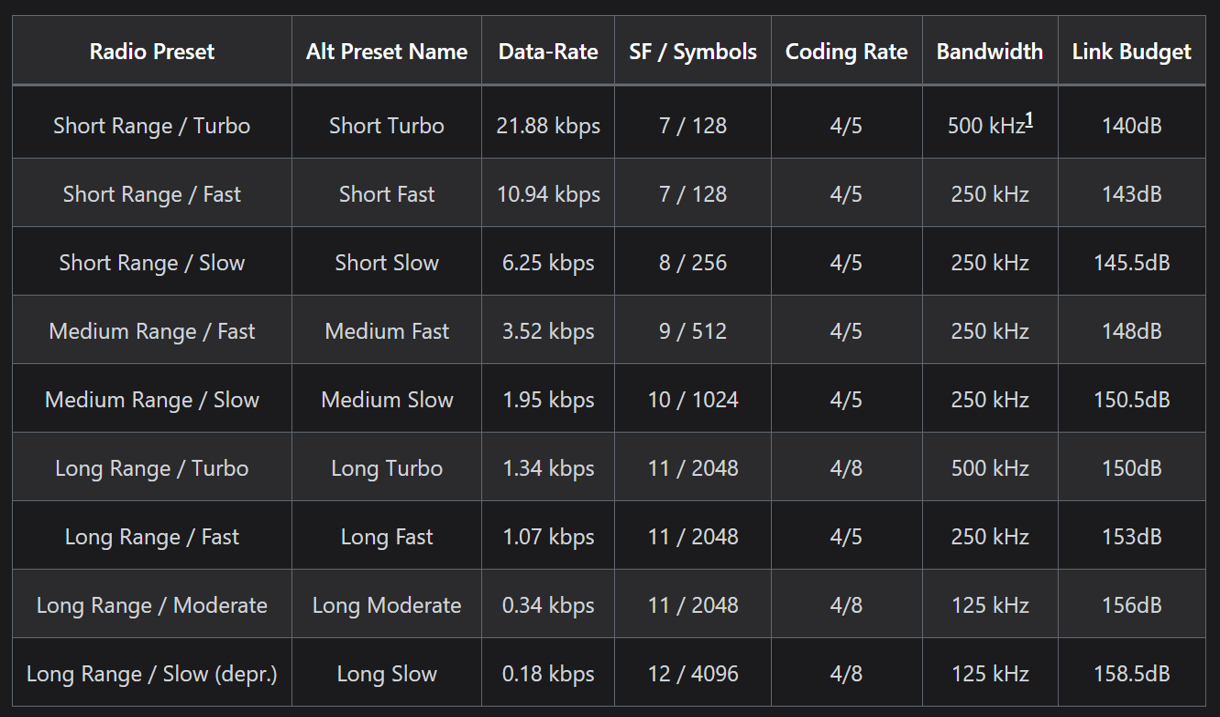
But the downside of doing that is that as you can see in the rightmost column, these faster presets travel less far (aka less link budget). So you’re trading off speed for distance. Kinda like upgrading from 2.4 GHz wifi to 5 GHz wifi, it ain’t gonna reach out into the back yard or shed or whatnot. So these tests were designed to see how links degraded at faster presets.
We picked FreqSlots that were non-default as well as requested setting changes so that we could further reduce congestion. This would help fix the pie chart in the Malla summarizing our traffic. SO much of it was non-message traffic and we wanted to address that so that the larger highway would prioritize cars with people, not just empty Waymos lol.
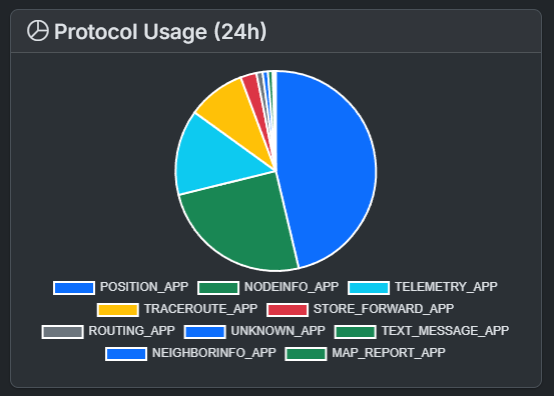
For those newbies among us, Meshtastic sends a lot of packets in the background. Messages are just one small part of the pie (called TEXT_MESSAGE_APP in the chart above). Many of our recommended settings changes from the tests aimed to reduce all of the other packets being sent so there’s more bandwidth for those messages to be sent.
We also picked freq slots to be kind to those with AirFrames Cavity filters. This is why we didn’t just change to the default MediumSlow frequency but instead asked people to use FreqSlot 22. The two reasons for this were:
- Because it’s non-default, we are unlikely to encounter anyone who isn’t explicitly partipating in our test and therefore aren’t using our recommended settings.
- It’s in an area close to, but not immediately next to, LF20 so folks with cavity filters don’t need to retune them.
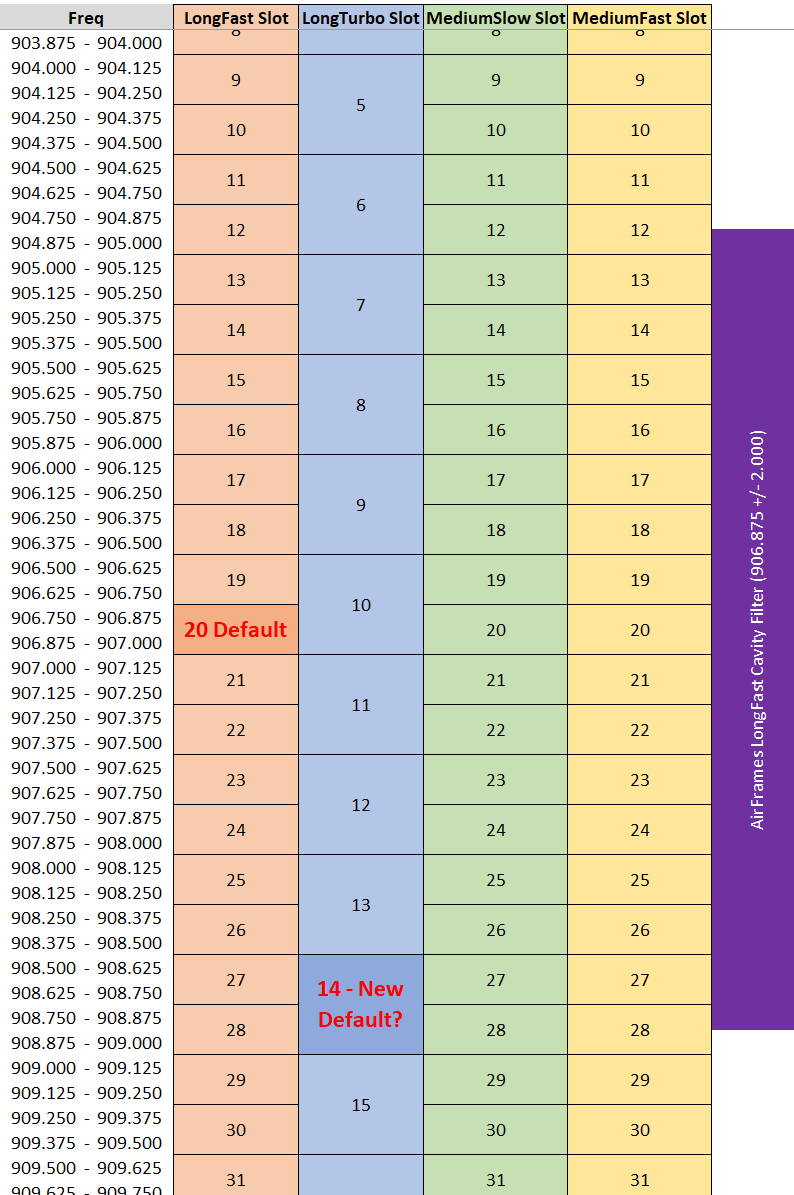
If you’re curious, below is a chart showing the actual frequencies that result when you use a particular frequency slot with a preset. LongFast 20 (the current default) gives you the 906.750 - 907.000 slot. MediumSlow 22 is nearby, around 907.250 - 907.500. The purple bar on the right shows what range the Airframe Cavity Filters are tuned for out of the box. They work best toward the center of that purple band.
You’ll also notice the LongTurbo “14 - New Default?” note. Meshtastic is considering moving their default preset from LF20 to LT14, which I’ll touch on a little later.
Challenges we must overcome
Other cities like NYC, which are pretty flat, have it easy compared to Philly. We have this unique mix of dense urban, flat topography… and then suburban, hilly terrain with tall hills blocking the city in.
In addition to geologic challenges, to date our mesh has been pretty ad-hoc. We don’t have many infra nodes, meaning we’re relying on users like you and me to act as infra nodes if we have a good vantage point and pass traffic to the less fortunate in valleys, riverbeds, etc.
We also have a LOT of nodes that were set up, maybe used for a week or two, and then left on. Which is, in theory, helpful because it’s a mesh and they pass on traffic. BUT they are running older firmware (we’ll get to that with LongTurbo) and in the mindset of congestion - the Meshtastic defaults and/or what many users set is creating needless congestion.
Many of these older nodes are blasting position every hour (or more frequent) as a stationary node. Or sending out telemetry like battery stats, air temp, etc. And in some cases they’re set to the wrong role (like ROUTER) when they should be CLIENT, so they’re locally negatively impacting the mesh.
During our tests and with the upcoming changes that will be announced once we decide on them, we would be leaving them behind in the short term, with the hope that those node owners will realize we’ve moved on and they can join us once they update and fix their nodes. This change was never intended to be exclusionary, but instead a catalyst for node owners to fix their nodes to be more mesh-friendly, congestion-wise.
So what did we find during our tests?
MediumSlow 22 (MS22) was chosen first because it was the higher bandwidth of the two presets we wanted to test and we thought it was less likely to work given the mesh challenges described above. We had a VERY WEIRD few days of very degraded links and noise floor issues that we could not figure out, and we finished the week with the Ops Div going “wellllll that didn’t go great but that was the stretch preset so no biggie, let’s move to Long Turbo.”
LongTurbo 12 (LT12) started unofficially a day early and even within the OpsDiv we struggled to get it to work. We uncovered a latent issue with legacy firmware where your app can set LongTurbo as a preset… the node takes that preset setting and then tells the app “I’m good boss” but then has zero idea what it is doing.
We think we may have seen a node or two doing this that was also blasting out garbage traffic due to elevated noise floors from neighboring nodes but (we’ll get to noise floor in a bit) we’re not sure.
Ultimately though, strike one for LongTurbo - it requires only the most recent alpha/beta in firmware to work but won’t tell you that when you set it. If we made this our default preset for Philly Mesh, we would be troubleshooting LongTurbo f*ckery in the Discord day and night forever. We want something that you set and it works, so this was already a near-disqualifying issue with LongTurbo.
Once we got nodes updated firmware-wise, things still weren’t going great. If you look at the chart of presets above, LongTurbo is kinda unique as it’s one of only two presets that uses a 500 kHz bandwidth (the other being ShortTurbo). To continue the wifi analogy, it’s like setting a 160 MHz width channel when everyone else is on 80 MHz. Some devices straight up won’t communicate with it. The device has to TX and RX on 2x the width of spectrum.
We noticed that some of the devices seem to struggle to make connections where MS22 had previously worked, which made no sense. It seemed there were particular issues with RAK4631 devices (which make up about 20% of the devices on our mesh), but other RAK4631s worked fine. And one T096 had issues.
Looking at the SDR plots we think some of the devices have some serious spurious emissions (blasting RF outside where the TX bandwidth of 500 kHz). This is early testing from yesterday so not confident in the results, but we’re noticing that qualitatively some of these nodes just straight up don’t like a 500 kHz bandwidth.
What is more concerning is that a few of us kicked on our SDRs to look at traffic and noticed something we shoulda seen coming. Enter new villain into this testing: NON-MESH RF INTERFERENCE…
Non-Mesh RF Interference (boooooooo hissssss)
Here’s a video recording of my SDR. For those unfamiliar, there’s a spectroscope at the top showing the live reading, with the y-axis being intensity / sound level and the x-axis being frequency. I’m listening to a couple of MHz of the ISM band here, moved up away from LongFast to show you what we’re picking up.
It is A LOT. And it’s everywhere on the ISM band, including where LongFast is, where LongTurbo12 is, where MediumSlow22 is, insert whatever preset you want… it’s got SO much chirps. All the chirps.
One of our members, Dusty, lives next to [REDACTED MANUFACTURING FACILITY] and had picked up a LOT of this and OpsDiv was like “wellllll I’m sorry that sucks for your location”. Little did we know we don’t have to live next to [REDACTED MANUFACTURING FACILITY] to be seeing this.
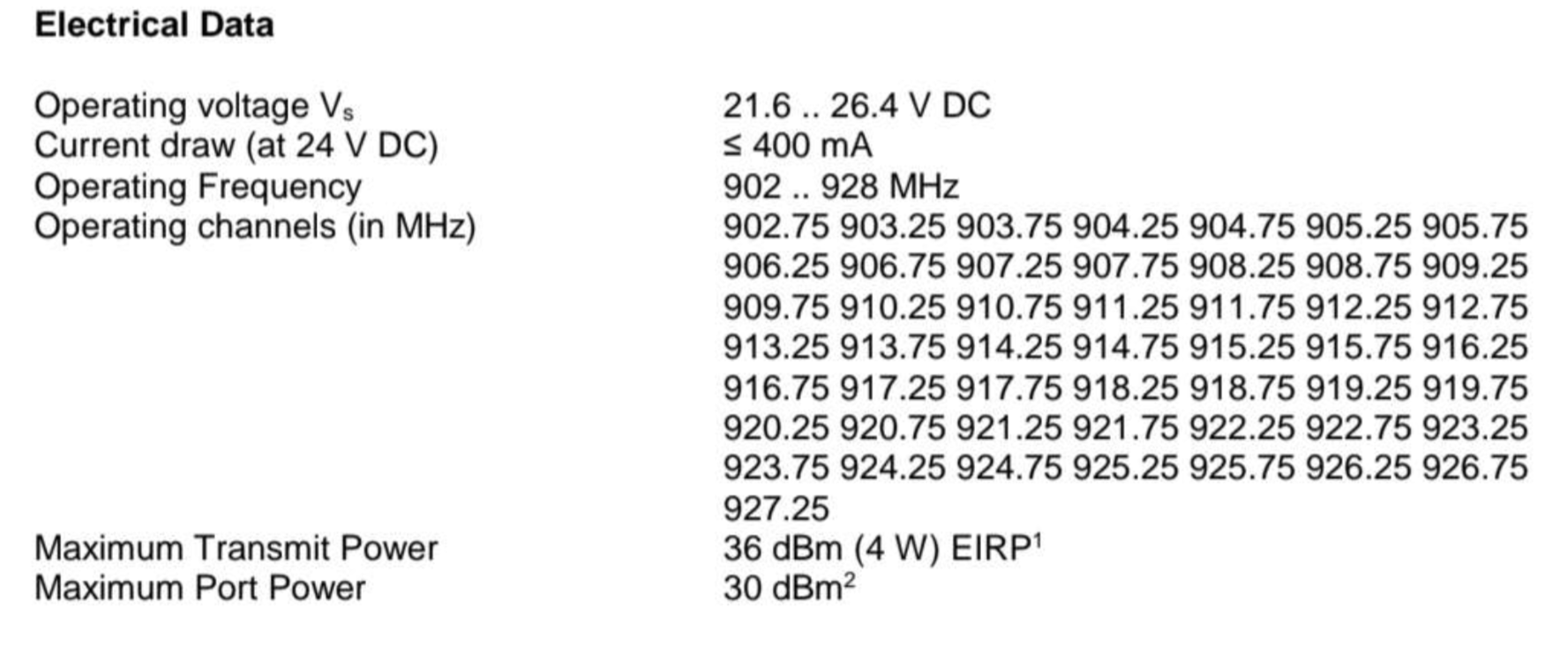
But the interesting find from Dusty is that the RFID card readers seem to use specific frequencies. And the loudest, most frequent chirps we are all seeing on our SDR scopes matches these frequencies. Very specifically at the 9XX.25 and 9XX.75 intersections.
We see this all over the greater Philadelphia area - PA burbs, Jersey burbs - and while it’s much stronger in Center City, it’s still bad enough everywhere to be a huge issue. Here’s an SDR image capture from Center City:
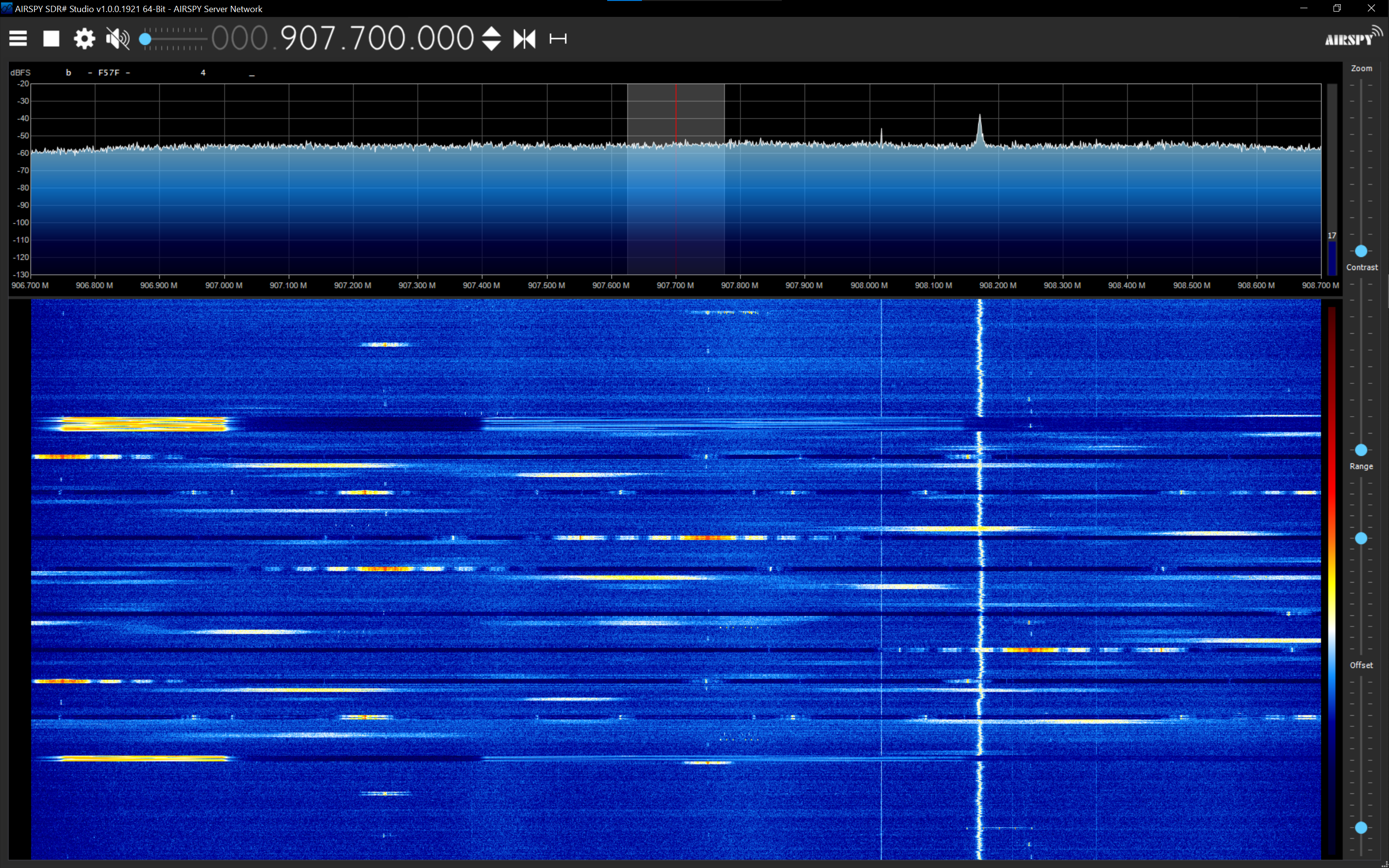
While you might be able to avoid some of this if you’re using a skinnier bandwidth like 250 kHz, you can’t avoid it with the wider 500 kHz bandwidth used by the Turbo presets. You’ve got multiple interference points with the 9XX.25 and 9XX.75 RFID stuff, as well as all the other little chirps in-between.
So yeah, all of us looking at our SDRs came to the conclusion that LongTurbo on any slot is doomed from the start for us. We thought we were being cutesy avoiding mesh packet collisions … but we were getting packet collisions no matter what from the ISM Band being the ISM Band, and in LongTurbo’s case … double the packet collisions.
So… what now?
We’ve kinda come to the conclusion that LongTurbo ain’t gonna work. As a preset it is demonstrably worse than LF/MS due to the firmware issue as well as the 2x interference issue.
We wanted to update the wider Discord on our findings and open it up to y’all to vote on next steps… But before that vote, we have one more science experiment we’re cooking up based on our findings.
One last test to try
All of us were trying to be nice to AirFrames users, but other meshes have comfortably asked them to retune to new presets. I think we have got to that point too. With the 9XX.25 and 9XX.75 interference being the most common, widespread, and impactful interference … we CAN play frogger with a 250 kHz bandwidth. But the default slots all line up with one of them at one end of the slot, no matter what. Take a look at the below chart and you can see, every single preset touches a 9XX.25 and 9XX.75.
Buuuuuuuuuuuuuut if we use a frequency override, we can slot the 250 kHz slice right in-between the 9XX.25 and 9XX.75 blips and avoid the interference. By strategically picking one of those slots close to both the pending new Meshtastic preset of LT14 and the Meshcore 910.525 default, we would be asking AirFrames users to retune once and then be able to use that filter for Philly Meshtastic, LT14 soon-to-be-new-default Meshtastic, AND Meshcore.
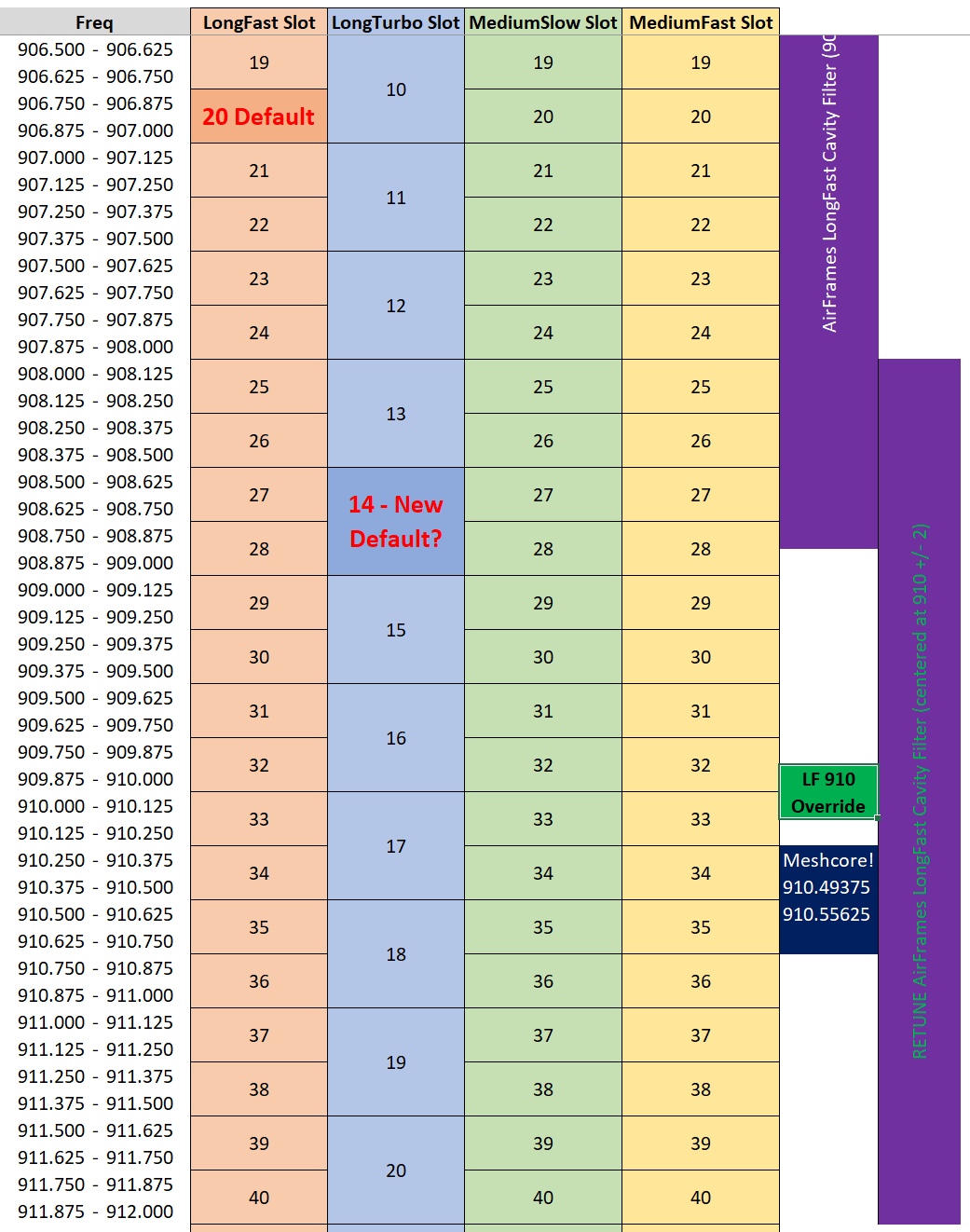
So the science experiment since the conclusion of LT12 and MS22 has been to try out LF-910. Basically it doesn’t use a Freq Slot but centers its 250 kHz bandwidth at 910 (again, see green box on the chart).
It’s easy to change, you just type in “910” into the frequency override box in the Lora Settings. It does not require firmware updates (oh thank goodness). And we are picking LongFast because we want to keep it apples to apples compared to LF20 preset (during our testing phase) so that we can compare links with interference vs links without interference. If this works we can evaluate in the future if we want to stay on LF910 or use MS910.
We aren’t asking everyone to participate in this, we realize there might be a little bit of testing fatigue after two weeks of this, but here’s the plan if you’d like to participate:
Third and final (hopefully) test plan - EXTENDED LF-910 TEST
After a few days, a majority of the ~50 or so nodes currently on LF910 (at the time of this post) report that it is working surprisingly well. Links are significantly improved compared to LF20 and mesh users are having stable/reliable conversations that were not previously possible on LF20. As a result, Philly Mesh OpsDiv has decided to conduct an extended test of LF910. If this is where we want to be long term, we want to stay on it longer to make sure there aren’t any critical flaws/issues with this change. And to support this being an extended test, we have not chosen a specific end date for this test. We will have an update on the Discord as well as a new blog post when we are ready to recommend a permanent change, and will communicate more details then. It is also possible that during this extended test we may find a specific frequency better (with less non-mesh interference) than 910.000 MHz, but for now this is the best we’ve found and we encourage mesh node owners to hop over and voluntarily try this extended test with us!
To do so, switch your node to LF910 using these settings:
- Modem Preset: Long Range / Fast
- Frequency Slot: 0 (doesn’t matter because we’re going to override it)
- Frequency Override: 910.000 MHz
- Bandwidth: 250 kHz (if asked, but should be set by the Long Range / Fast preset)
Here is what the settings should look like in your app. Android on the left, and iOS in the center and on the right.
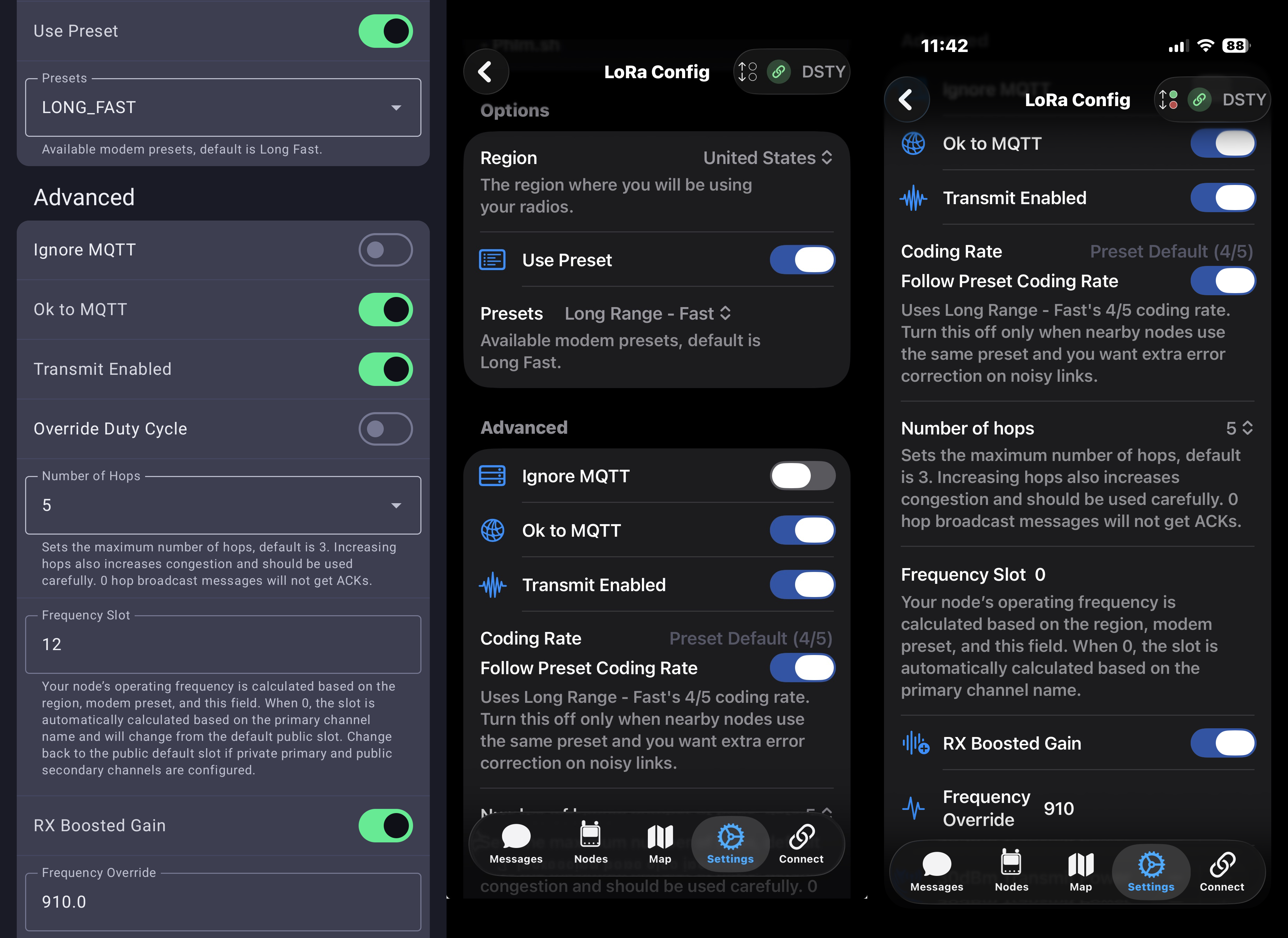
Keep all other settings from the previous test active. The iOS app and Android apps can be confusing, so we recommend installing the Meshtastic CLI and querying your nodes settings that way to verify they’re correct. Here’s a sanitized version of what your settings should look like:
The following is an example of the settings you should have if you’re participating in the test. If a setting is omitted, it’s up to you what you want to set it as.
Notes: role should be set to Client Mute if you’re in a position where a particular node doesn’t need to rebroadcast messages to other nodes, and position settings can be turned off if you don’t want to send position to the mesh
Preferences: {
  "device": {
    "nodeInfoBroadcastSecs": 10800,
    "role": "CLIENT",
    "rebroadcastMode": "CORE-PORTNUMS-ONLY",
  },
  "position": {
    "positionBroadcastSecs": 3600,
  },
  "lora": {
    "usePreset": true,
    "modemPreset": "LONG_FAST",
    "bandwidth": 0,
    "spreadFactor": 0,
    "codingRate": 0,
    "region": "US",
    "hopLimit": 3,
    "txEnabled": true,
    "txPower": 30,
    "channelNum": 0,
    "sx126xRxBoostedGain": true,
    "frequencyOffset": 0.0,
    "overrideFrequency": 910.0,
    "configOkToMqtt": true,
  }
}

Module preferences: {
  "telemetry": {
    "deviceUpdateInterval": 2147483647,
    "environmentUpdateInterval": 0,
    "environmentMeasurementEnabled": false,
    "environmentScreenEnabled": false,
    "environmentDisplayFahrenheit": false,
    "airQualityEnabled": false,
    "airQualityInterval": 0,
    "powerMeasurementEnabled": false,
    "powerUpdateInterval": 0,
    "powerScreenEnabled": false,
    "healthMeasurementEnabled": false,
    "healthUpdateInterval": 0,
    "healthScreenEnabled": false,
    "deviceTelemetryEnabled": false,
    "airQualityScreenEnabled": false
  }
}
What if I don’t want to participate
You are not obligated to test out LF-910 with us, feel free to switch your radio back to default LT20 presets!
Modem Preset: Long Range / Fast Frequency Offset: 0
Verify that your primary channel is set to LongFast / AQ== or Primary.
If you want to change each setting, below shows the particular settings you’ll need to change.
Preferences: {
  "lora": {
    "usePreset": true,
    "modemPreset": "LONG_FAST",
    "bandwidth": 0,
    "spreadFactor": 0,
    "codingRate": 0,
    "region": "US",
    "txEnabled": true,
    "txPower": 30,
    "channelNum": 0,
    "frequencyOffset": 0.0,
    "overrideFrequency": 0.0,
  }
}
This shows you only the settings you need to change to get back to talking on the default LF20. If a setting is omitted, it’s because it’s personal preference.
However, for example, we asked people to limit telemetry during the test so your current telemetry settings might be different than default. Now that you’re going back to LF20 you can change any settings not included here to whatever you want and still be able to communicate with LF20.